Adding New Product to Store
List of Content
- Preface. Background of Foodly Theme Development 0
- Marketing. Foundation of Selling Online 1
- Content. Key to More Sales & Profit 2
- Audience. Backbone of Personalized Shopping Experience 3
- Conversion Rate. Foundation to Estimation of Success 4
- Getting Started with Foodly Theme 5
- Setting Up Navigation 6
-
Working with Products
12
- Working with Products
- Adding New Product to Store
- Adding "Nutritional Value" to Product Description
- Adding Product to Collection
- Product Images
- Product Type (Harvest 2014 and etc.)
- Product Tags
- Sale Badge
- Special Product Size
- How to Change Product Page Link
- Product Packaging
- Product Builder
- Product Pack
- Managing Collections 24
- Handling Pages 29
- Running Blog 36
- Processing Gift Card 44
-
Adjusting Theme Settings
45
- Adjusting Theme Settings
- Presents
- Colors
- Typography
- Header
- Footer
- Home Page Slideshow
- Home Page
- Product Page
- Shopping Cart
- Collection Page
- Blogs
- Contact Page
- 404 page and password page
- Wishlist
- Search
- Lookbook Page
- Landing page
- Subscription of Your Store
- Notification button
- Shipping Rates Calculator
- Currency
- Checkout
- Setting Up Third-party Tool 67
- Acknowledgment 74
Adding New Product to Store
To add a new product to your online store, please, go through the following steps:
- Log in into your Shopify admin panel
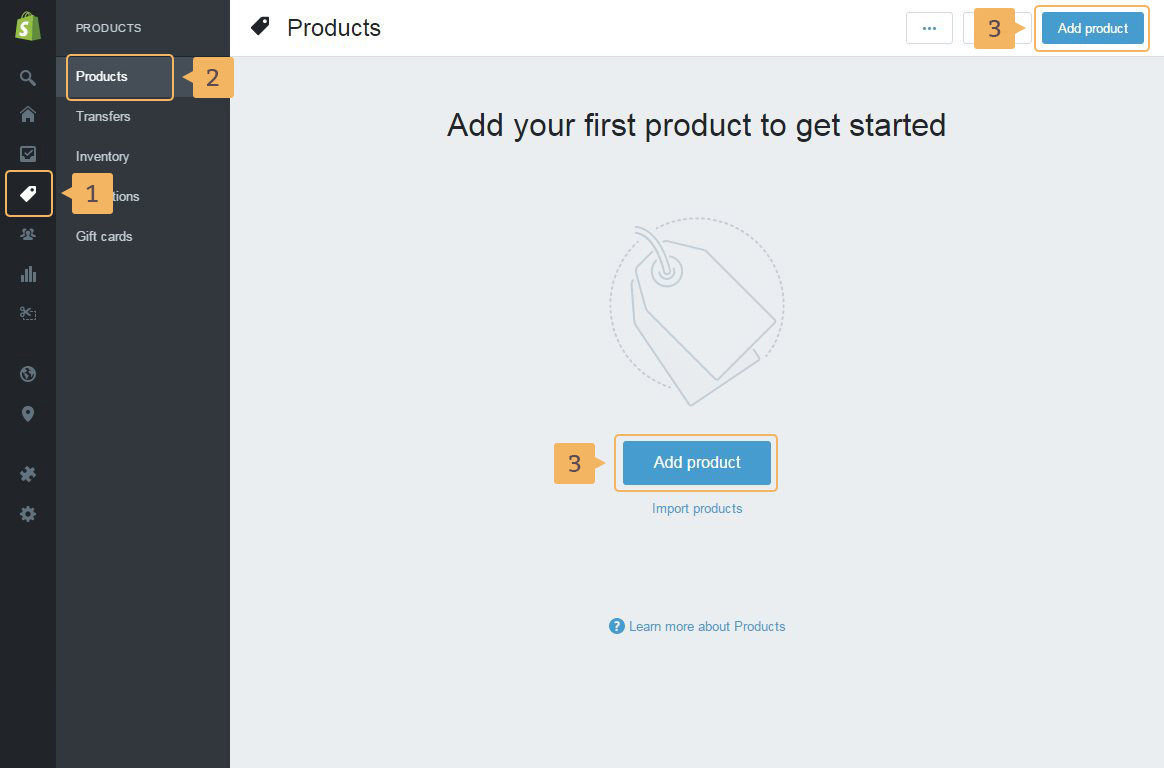
- To open page Products page in admin panel: click 'Products' in the sidebar menu of Shopify admin panel (Fig. 3.1 - [ 1 ]) > 'Products' again in the second level menu(Fig. 3.1 - [ 2 ])
-
Add new product clicking on one of 'Add product' buttons in the upper right corner or in the center of the page(Fig. 3.1 - [ 3 ]).
Also, you can import products to your store using CSV file (Fig. 3.1 - [ 4 ]). More about import is in Shopify Manual
Very explicit instructions how to work with product in Shopify theme you can find in this Shopify help guide.