Page with All Collections
List of Content
- Preface. Background of Foodly Theme Development 0
- Marketing. Foundation of Selling Online 1
- Content. Key to More Sales & Profit 2
- Audience. Backbone of Personalized Shopping Experience 3
- Conversion Rate. Foundation to Estimation of Success 4
- Getting Started with Foodly Theme 5
- Setting Up Navigation 6
-
Working with Products
12
- Working with Products
- Adding New Product to Store
- Adding "Nutritional Value" to Product Description
- Adding Product to Collection
- Product Images
- Product Type (Harvest 2014 and etc.)
- Product Tags
- Sale Badge
- Special Product Size
- How to Change Product Page Link
- Product Packaging
- Product Builder
- Product Pack
- Managing Collections 24
- Handling Pages 29
- Running Blog 36
- Processing Gift Card 44
-
Adjusting Theme Settings
45
- Adjusting Theme Settings
- Presents
- Colors
- Typography
- Header
- Footer
- Home Page Slideshow
- Home Page
- Product Page
- Shopping Cart
- Collection Page
- Blogs
- Contact Page
- 404 page and password page
- Wishlist
- Search
- Lookbook Page
- Landing page
- Subscription of Your Store
- Notification button
- Shipping Rates Calculator
- Currency
- Checkout
- Setting Up Third-party Tool 67
- Acknowledgment 74
Page with All Collections
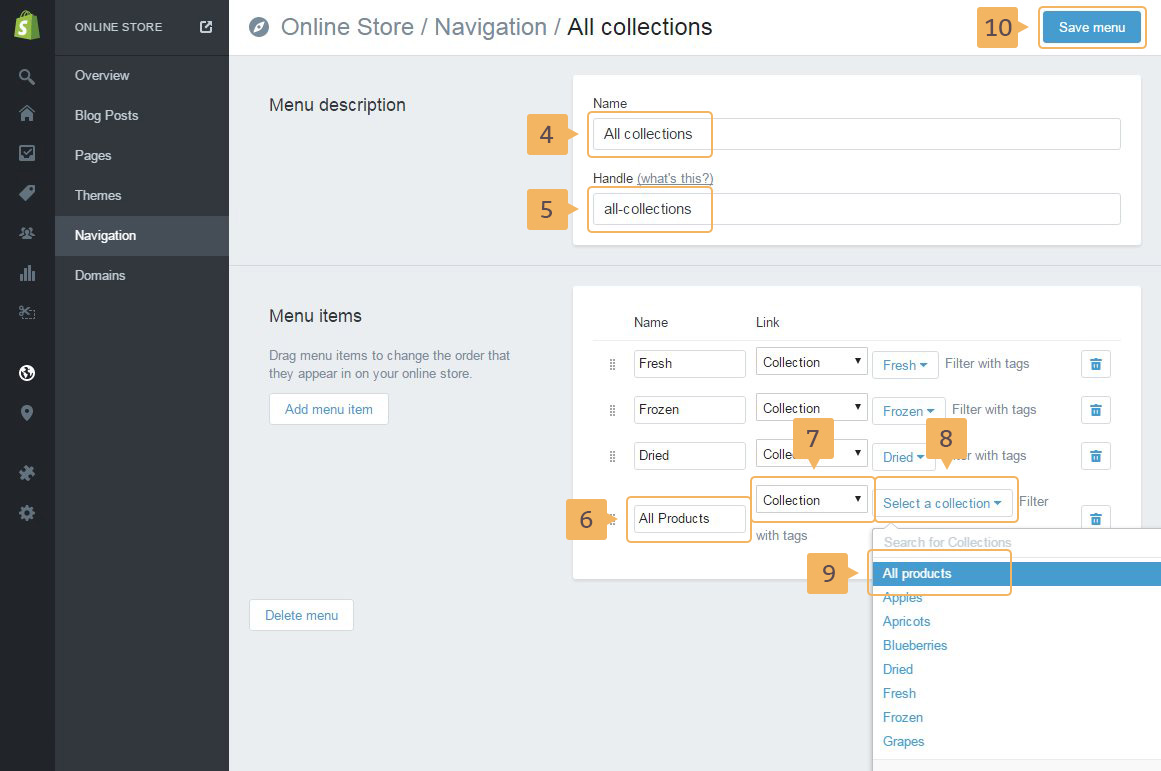
On this page are displayed all collection. The look of this page in Figure 4.7. To adjust the list of collections, please, go through the following steps:
- Open navigation page: 'Online store' (Fig. 4.5 - [ 1 ]) > 'Navigation' (Fig. 4.5 - [ 2 ])
- Add new menu (Fig. 4.5 - [ 3 ])
- Type the name (Fig. 4.6 - [ 4 ]) of menu and handle (Fig. 4.6 - [ 5 ])
- Create menu items. Every item it's the collection which will be shown in the page. Type the collection name (Fig. 4.6 - [ 6 ]), choose collection link (Fig. 4.6 - [ 6 ] - [ 9 ]).
- Save changes (Fig. 4.6 - [ 10 ]).